
Arduino Modulino® Buttons
Manufacturer
Part #
Category
Arduino AKX00069 ConnectorsDescription
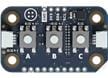
Arduino Modulino® Buttons is a user-friendly input device featuring three tactile push-buttons, each equipped with an RGB LED for customizable visual feedback. Designed for seamless integration with Arduino Uno R4 boards via the Qwiic I2C connector, this module allows users to easily implement interactive controls in projects. The modular, solderless design makes the device perfect for rapid prototyping, educational environments, and hobbyist applications.

Arduino Modulino® Buttons
Introduction
The Arduino Modulino® Buttons is an innovative input device designed to enhance user interaction in various projects. With its tactile push-buttons and customizable RGB LEDs, this module provides an intuitive way to implement controls in your Arduino-based applications.
Part Description
The Arduino Modulino® Buttons features three SPST (Single Pole Single Throw) push-buttons, each accompanied by an RGB LED for visual feedback. This module is engineered for seamless integration with Arduino Uno R4 boards through the Qwiic I2C connector, making it easy to add interactive controls to your projects. The onboard STM32C011F4 microcontroller manages the LED colors and brightness independently, allowing for efficient communication over I2C. Its modular and solderless design makes it ideal for rapid prototyping, educational settings, and hobbyist projects.
Applications
- Interactive interfaces
- Educational projects
- Control panels
- Menu navigation systems
- User input devices for IoT applications
Industries
- Education
- Consumer Electronics
- Internet of Things (IoT)
- Robotics
- Prototyping and Maker Communities
Usage Ideas
-
Interactive Learning Tool: Create an educational project where students can use the buttons to navigate through a quiz or educational game, with the RGB LEDs providing feedback on correct or incorrect answers.
-
Smart Home Control Panel: Develop a control panel for smart home devices, allowing users to turn lights on/off or adjust settings with the push of a button, while the LEDs indicate the status of each device.
-
DIY Game Controller: Build a simple game controller using the Modulino® Buttons for a retro gaming project, where each button corresponds to different actions in the game, enhanced with visual feedback from the LEDs.
Conclusion
The Arduino Modulino® Buttons is a versatile input module that opens up a world of possibilities for interactive projects. Its user-friendly design, combined with the ability to provide visual feedback, makes it an excellent choice for educators, hobbyists, and professionals looking to create engaging user interfaces. Whether you're building a control panel, an educational tool, or a game controller, this module is sure to enhance your project experience.